Running X4 for modding
X4 writes no log file. Not a short one, not an empty one: started the way a player starts it, the game produces nothing to read afterwards. Every error a mod causes, every line a script prints, every complaint the engine has about a malformed file is composed, formatted and then thrown away, because no output file was ever opened.
That is one command-line switch, and the difference between guessing at a bug and reading it. A second switch decides how much goes in. Everything else on this page is either a way to pass those two, or a way to make the twenty launches that follow them less painful.
The game's own documentation of this is a wiki page titled Launch Options which has been a work in progress since it was created: fourteen half-filled rows and seventeen that read Example | Example. This page is what the game actually accepts, read out of X4.exe and then run.
Sent here by a mod author for a log? The last section is written for exactly that, and nothing before it is needed.
Contents
- How this page was checked
- Where the options go
- The debug log
- Getting a mod's own output into the log
- A setup that works
- Cutting the noise
- Every option
- Traps
- Sending a log to a mod author
How this page was checked
The option names are the ones the parser in X4.exe compares an argument against, read from the executable itself: 80 of them in 9.00, 79 in 8.00, and the single addition is -pauseonload. The debug filter names come from the table the engine looks a -debug argument up in: 64 in 9.00, 63 in 8.00, the addition being Materials. Neither list is guessed at and neither is a community collection; they are what the two builds hold.
What each option does is a separate question, and the executable answers it only in part. Where this page says an option was measured, it was passed to a real 9.00 install and its effect read out of the log or the file system. Everywhere else the description is read from the option's name and from the config.xml entry that shares it, which is as far as the binary takes it - useful, and not the same as proven.
Where the options go
An option is a word starting with -, and one that takes a value is followed by that value as a separate argument, not joined with = or ::
X4.exe -skipintro -debug scripts -logfile logs\x4.log
Unknown options are ignored in silence. There is no usage text, no error, and no exit code that says a switch was misspelled - a typo simply does nothing, which is worth remembering when an option appears to have no effect.
Steam
Library, right-click X4: Foundations, Properties, General, and the Launch Options box at the bottom. Everything typed there is appended to the command line.
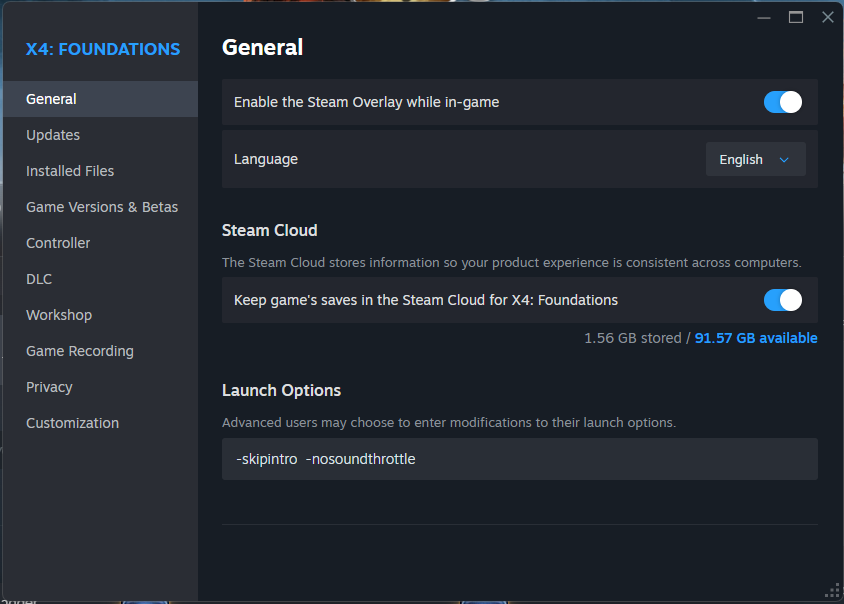
The box is per account and travels with the Steam profile, so it follows to another machine and survives a reinstall of the game. Of all the routes on this page it is the one that needs setting up once.
GOG Galaxy
Galaxy does not have a plain arguments box. It has a list of executables, and the arguments belong to a row in that list: the game's page, the settings button beside Play, Manage installation, Configure, and then the Features tab.
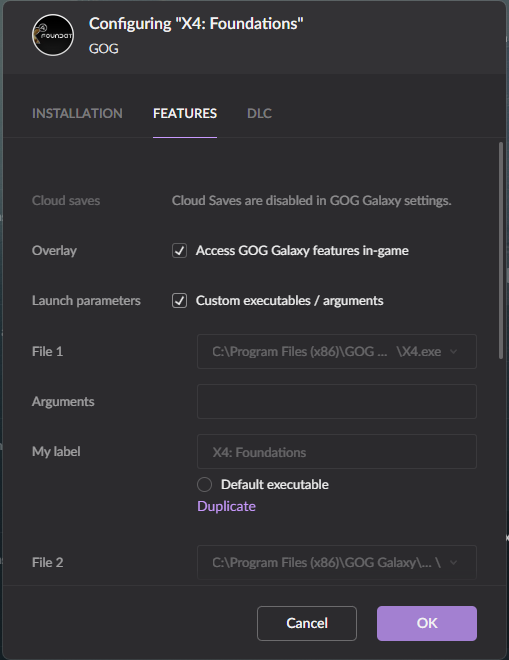
The rows that come with the game are its stock entries - the game itself, the manual - and they are the wrong place to type. Duplicate one, put the arguments on the copy, give it a label, and mark the copy Default executable so the Play button uses it.
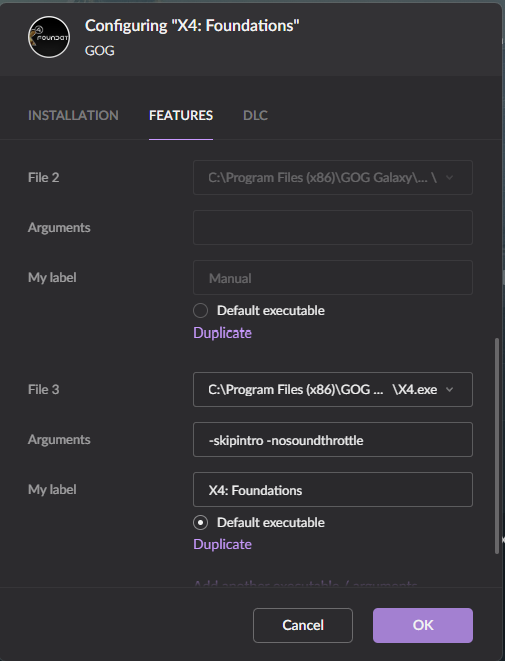
A GOG install also has a plain X4.exe in its folder that runs without Galaxy at all, which is the easier target for a shortcut or a batch file.
Any other launcher
Some have a per-game arguments field and some do not. Either way the install folder holds an X4.exe that takes the options directly, and a shortcut or a batch file pointed at it is what the rest of this page assumes.
A shortcut
Right-click the shortcut, Properties, Shortcut, and put the options after the quoted path in Target:
"C:\Program Files (x86)\GOG Galaxy\Games\X4 Foundations\X4.exe" -skipintro -debug scripts -logfile logs\x4.log
Start in must be the game folder. X4 resolves its own data relative to the working directory, and a wrong one produces Missing game files detected; possibly using incorrect working directory.
A shortcut the store made is not a shortcut to the game. The one GOG puts in the Start menu points at the launcher and names the game as a parameter:
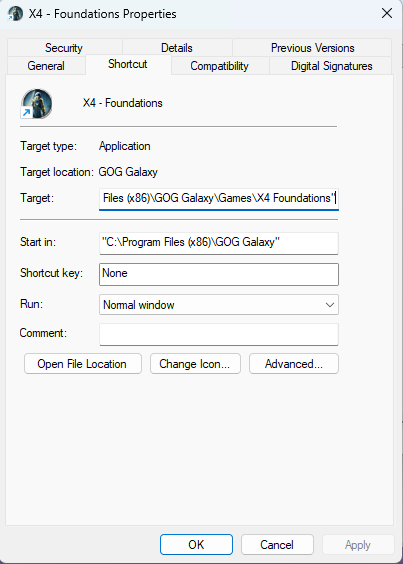
Target:   "C:\Program Files (x86)\GOG Galaxy\GalaxyClient.exe" /command=runGame /gameId=1588366064 /path="C:\Program Files (x86)\GOG Galaxy\Games\X4 Foundations"
Start in: "C:\Program Files (x86)\GOG Galaxy"
Anything appended to that Target is an argument to GalaxyClient.exe and never reaches X4. Steam's Start menu entries have the same shape, as a steam://rungameid/ link. Either make a shortcut of your own that points straight at X4.exe, or use the launcher's own arguments field above.
Linux, Proton and the Steam Deck
The Steam launch options box is shared by the native and the Proton build, and the arguments go in the same place. Where a wrapper command is already in the box, the game's own options belong after %command%:
PROTON_LOG=1 %command% -skipintro -debug scripts -logfile logs/x4.log
Paths inside a -logfile argument are the game's own, so they land under the Proton prefix's Documents rather than in $HOME.
The debug log
Nothing is written unless it is asked for
Measured on 9.00: a session started with no -logfile leaves nothing behind. Not in the personal folder, not in logs/, not in the game folder. -debug on its own changes nothing either, because there is nowhere for the output to go.
There is a -nodefaultlog switch in the parser, which reads like the opposite claim. Whatever it suppresses, it is not a file that appears in either of those places, and this page does not claim to know what it is.
-logfile <file>: where the file lands
The argument is a path relative to the personal folder, the folder that already holds config.xml and save\. Where that folder is depends on how the game was started:
| Install | Personal folder |
|---|---|
| Steam | Documents\Egosoft\X4\<Steam account id>\ |
| GOG, and any other install not run through Steam | Documents\Egosoft\X4\ itself, with no id in the path |
any install started with -personalfolderid <id> |
Documents\Egosoft\X4\<id>\ |
Both of these were measured, with that folder written as <personal folder>:
| Argument | File written |
|---|---|
-logfile x4.log |
<personal folder>\x4.log |
-logfile logs\x4.log |
<personal folder>\logs\x4.log |
logs\ is the better habit: it is where -scriptlogfiles writes too, and it keeps the profile folder readable. The file is overwritten on every launch, so a log worth keeping is one to name per session - which is what the timestamped names in the batch file further down are for.
What a line looks like
Logfile started, time Wed Sep 23 17:20:29 2026
[General] 0.00 ======================================
[=ERROR=] 0.00 File I/O: Could not find signature file '.\extensions\deadair_eco\t\0001.xml.sig' (there will be no more errors for missing signatures; enable debug filter 'fileio' to get all signature verification failures)
[FileIO ] 0.00 File I/O: Failed to verify the file signature for file '.\extensions\kuertee_ui_extensions\t\0001.xml' (error: 14)
[Init   ] 0.00 Entering startmenu in 9.00 (611726)
[Scripts] 190.79 *** Context:md.NPC_State_Machines.NPC_Check_Lost<inst:c6a87>: NPC no longer exists but case was not caught by NPC_Killed - Aborting state machine. [Owen]
The bracket holds the filter the line came from, padded to seven characters and not truncated, so [Economy_Verbose] is wider than the rest. Errors are not a filter but a flag on the line, and print as [=ERROR=].
The number is game time in seconds, the same value a script reads as player.age, and it does not start until the game loop does. Everything logged while the game loads is stamped 0.00, however long that takes. Loading a save sets it back to 0.00 while the files are read, and then to the saved game's own time:
[Init   ] 0.00 Loading saved game 'save_007', first pass
[Init   ] 0.00 - Saved in 7.60 (562021), game time = 20d 06h 01m, gamestart 'x4ep1_gamestart_intro' started in 7.10 (538965)
[Init   ] 1749666.70 Loading saved game 'save_007', second pass
-debug <filter>: choosing what goes in
One filter per switch, and the switch repeats:
-debug general -debug fileio
Measured on 9.00, all three of these:
- Repeating accumulates.
-debug general -debug fileioproduced both[General]and[FileIO ]lines. - A comma-separated list does not work.
-debug scripts,fileioproduced neither[Scripts]nor[FileIO ]- the whole word failed to match any filter and was dropped without a complaint. allworks, although it is not one of the 64 names in the table.-debug alland-debug general -debug fileioproduced the same set of prefixes on the same start-menu run.
Matching is case-insensitive: -debug fileio enables the filter the table spells FileIO.
What is logged whatever you do
A run with no working filter at all still produced [General], [=ERROR=] and [Init ] lines. Those three need nothing turned on, which is why a log is worth having even without -debug: an error from a mod is in it either way.
Everything else is off until named. In particular [Scripts] is off, and [Scripts] is where a mod's own <debug_text> comes out.
The filters
The 64 names the 9.00 table holds, in its own order:
General                None                   3D                     3DChar
3DEffectsystem         3DText                 AIFlight               Animation
Building               Combat                 ControlTexture         Conversation
Cutscenes              Dismantling            Display                Docking
Economy                Economy_Verbose        Envmap                 FileIO
FirstPersonControl     GameGraph              Gfx                    Gfx_Sync
God                    Gravidar               Init                   Input
Job                    JPM                    JPM_Verbose            MassTraffic
Materials              MissionManager         Navigation             Navmeshes
Navmeshes_Verbose      NavOctrees             NavOctrees_Verbose     Network
Network_Verbose        Online                 Online_Verbose         Pedantic
Physics                Platform               PlayerControl          PlayerControl_Verbose
Regions                Reservations           RPCServer              Savegame
Scripts                Scripts_Verbose        Sound                  SoundVerbose
Splines                TextDB                 UI                     UI_Verbose
UnitTest               Verbose                VR                     XML
Materials is new in 9.00; 8.00 has the other 63.
A _Verbose name is a second, louder level of the filter beside it, and turning one on does not turn the other on. The handful worth knowing by name:
| Filter | What comes out of it |
|---|---|
Scripts |
<debug_text> from the Mission Director and AI scripts, and script errors with their context |
Scripts_Verbose |
the same, louder |
Savegame |
the filter vanilla itself uses most for long-running AI complaints |
Economy_Verbose |
vanilla's faction logic narrating its goals, and the noisiest thing on the list |
FileIO |
every file the loader could not verify, open or find |
XML |
the XML parser |
TextDB |
text page and text id lookups |
God |
universe and station generation |
For a mod being debugged, -debug scripts is the one that matters.
What all adds in practice
Most of the 64 names never produce a line in a released build. Three real play sessions started with -debug all - about eight hours on GOG 9.00, eleven on GOG 8.00 and a shorter one on Steam 9.00 - wrote seven prefixes between them, and four of those are there with -debug scripts as well:
| Prefix | With -debug scripts too |
Share of the 8-hour 9.00 log | What it held |
|---|---|---|---|
[Scripts] |
yes | 31% | <debug_text> from vanilla and every mod |
[General], [=ERROR=], [Init ] |
yes | 41% | the lines that are always written, Lua DebugError among them |
[Economy_Verbose] |
no | 26% | vanilla's faction logic narrating its goals, as FL:ECO and #FLS# lines |
[FileIO ] |
no | 1.5% | a signature failure for every unsigned file |
[Savegame] |
no | under 0.1% | script lines filed under savegame, savegame PATCH: reports among them |
The [Savegame] share swings with the save: the Steam session wrote more of those lines than [Scripts] ones.
So in practice -debug all is -debug scripts plus three filters, and the price is size rather than anything exotic. The 9.00 session came to 36 MB, of which a -debug scripts launch would have written about 26, and the whole file zipped down to 2 MB. What it buys is every filter a mod can name: a <debug_text> filed under economy_verbose, savegame or combat is invisible under -debug scripts, and the person sending the log rarely knows which one a mod uses.
Getting a mod's own output into the log
Mission Director and AI scripts
<debug_text> writes one line, and its filter attribute picks which filter that line belongs to. The schema allows eight values - error, general, scripts, scripts_verbose, economy_verbose, combat, savegame, none - and the default is scripts, so a <debug_text> with no filter needs the game started with -debug scripts before it is visible.
<debug_text text="'MyMod: station ' + $station.debugname + ' has ' + $count + ' modules'" filter="scripts" />
filter="error" is the exception, and the reason a mod's important messages usually carry it: an error line is written whatever -debug says, so a user who sends back a log started with -logfile alone still sends back the mod's errors.
The line arrives with its origin already attached - *** Context:md.<file>.<cue><inst:...>: - so there is no need to repeat the script's name in the text. A prefix that names the mod is still worth having, because it is what makes the log greppable:
grep -a "MyMod" logs/x4.log
One file per script: -scriptlogfiles
<debug_to_file> writes to a file of its own instead of the log, and it is silent unless the game is started with -scriptlogfiles. That is the game's own schema talking, in libraries/common.xsd:
Output debug text to logfile in game\logs folder under My Documents\Egosoft. Text will only be logged to a file if the game has been started with parameter
-scriptlogfiles!
The file lands at <personal folder>\logs\<directory>\<name>, where both come from the action's attributes, and the extension must be .txt, .csv, .log or .xml or .txt is appended. Vanilla uses it for station generation, which is why a profile that has ever run with the switch has a logs\god\ folder full of per-station files.
<debug_to_file name="'mymod.txt'" directory="'mymod'" text="$line" />
-scriptlogfiles is a flag and takes no argument. This is worth stating plainly because the batch file that has circulated in the community since 2018 passes it one:
rem what the old template does - the file name is a stray word the game ignores
start "" "%X4_EXE_PATH%" -debug all -logfile logs\%LOG_FILE_NAME% -scriptlogfiles %SCRIPT_LOG_FILE_NAME%
Measured on 9.00: -scriptlogfiles -logfile logs\probe.log wrote probe.log, so the switch did not swallow the argument that followed it. The stray word is harmless, and it has misled a lot of people into thinking -scriptlogfiles names a file.
Lua
A UI script has no -debug gate to pass. DebugError("text") writes an error line, which is always on, and an uncaught Lua error is written the same way with the file and line in front of it:
[=ERROR=] 8.97 C:/.../ui/addons/ego_gameoptions/gameoptions.xpl(2959): (from presentation 'ui/widget/presentation...
That is the whole of the Lua side: there is no per-filter Lua logging, so a UI mod that wants quiet tracing has to gate it itself.
Asking a player for a log
The last section of this page is written for players and stands on its own: where the launch options go, the one line to paste, where the file ends up and what to send with it. Its anchor is fixed, so a mod description or a reply to a bug report can link straight to it:
https://wiki.egosoft.com/X4%20Foundations%20Wiki/Modding%20Support/Running%20X4%20for%20modding/#bug-report
https://chemodun.github.io/x4/modding-support/running-x4-for-modding/#bug-report
Nexus and the Steam Workshop both take BBCode in a description:
[url=https://wiki.egosoft.com/X4%20Foundations%20Wiki/Modding%20Support/Running%20X4%20for%20modding/#bug-report]How to send a log[/url]
A setup that works
Keeping installs apart: -personalfolderid <id>
Left to itself, X4 never picks the personal folder by game version: a Steam install writes to a folder named after the Steam account id, and any other install writes straight into Documents\Egosoft\X4\ with no folder of its own. Two installs of different versions from the same store therefore share one profile, config, saves and logs alike. -personalfolderid 900 gives an install a folder of its own:
X4.exe -personalfolderid 900 ...
Measured on 9.00: the whole profile moves, logs included. With one of these per install, an 8.00 and a 9.00 test never share a config.xml, a savegame or a log folder, and no log-reading tool ever reads the wrong install's output.
Not losing settings to a test run: -dontsaveconfig
X4 rewrites config.xml when it exits, so a launch with -windowed -width 800 -height 600 normally leaves the game windowed at 800x600 the next time it is started from the library. -dontsaveconfig stops the write.
Measured on 9.00: repeated launches with -dontsaveconfig -windowed -width 800 -height 600 left config.xml byte-for-byte and timestamp unchanged, while userdata.xml was rewritten as usual. It belongs in every test shortcut that touches display settings.
Alt-tabbing: -nocputhrottle and -nosoundthrottle
X4 throttles itself when its window loses focus, which is exactly what a modder's session does every time an editor comes to the front. These two stop it. They are also what makes a log grow at a usable rate while the game sits in the background.
Skipping what does not need watching
-skipintro drops the intro movie. The log says so when it takes effect:
[Init ] 9.97 Game initialisation time until start menu fade-in (because of skipped intro video): 141 seconds
-load <savegame> names a save to load instead of stopping at the start menu, which turns a reload-and-retry cycle into one double click. It is read from the parser rather than measured here.
A batch file that does all of it
A log that is overwritten on every launch is a log that is lost the moment the bug is reproduced twice. Naming it after the clock fixes that, and a batch file is the shortest way there:
@echo off
set "X4_FOLDER=%PROGRAMFILES(X86)%\GOG Galaxy\Games\X4 Foundations"
set "PROFILE=900"

for /f %%I in ('powershell -NoProfile -Command "Get-Date -Format yyyy-MM-dd__HH-mm-ss"') do set "STAMP=%%I"

cd /d "%X4_FOLDER%"
start "" "%X4_FOLDER%\X4.exe" ^
  -personalfolderid %PROFILE% ^
  -logfile logs\x4-%STAMP%.log ^
  -debug scripts ^
  -scriptlogfiles ^
  -skipintro -nocputhrottle -nosoundthrottle -dontsaveconfig
The log then lands at Documents\Egosoft\X4\900\logs\x4-2026-09-23__17-20-29.log, one per launch, and the old ones stay. Swap -debug scripts for -debug all when the source of a problem is not known yet, and add a second copy of the file per install, changing only X4_FOLDER and PROFILE.
Nothing in that name is a game convention: X4 has no default log name at all, so a timestamped file is a habit the launcher imposes rather than something to look for in a folder the game filled by itself.
Cutting the noise
Two kinds of line dominate a modded log and neither is a problem:
Could not find signature file '...sig', once, as an error, followed by nothing more on the subject. Every unsigned file - which is every file of every unpublished mod - would otherwise produce one, so the engine says it once and stops. Turning-debug fileioon is what asks for the rest, and on a modded install that is over a hundred lines before the game has done anything.Failed to verify the file signature for file '...' (error: 14), the[FileIO ]version of the same thing.
The wiki carries a community guide, Reducing the x4.log to more relevant informations, which filters a finished log with a batch file. Not asking for the noise in the first place is cheaper: leave -debug fileio off, and -debug scripts alone gives a log that is almost all mod output.
For reading a log while the game runs, anything that tails a file will do; the log is written as it goes and is safe to read from another process.
The in-game Debug Manager is a separate thing entirely, reached with a different executable and driven by hotkeys rather than the command line; it is described on the wiki under Debug Manager Usage.
Every option
All 80 names the 9.00 parser accepts. <value> marks an option that reads the next argument; measured marks one whose effect was confirmed on a running 9.00 install rather than read from the executable.
Logging and diagnostics
| Option | What it does |
|---|---|
-logfile <file> |
measured - write the log to <file>, relative to the personal folder. Without it, nothing is written. |
-debug <filter> |
measured - enable one debug filter. Repeat per filter; all enables everything. |
-scriptlogfiles |
measured - enable <debug_to_file> output from MD and AI scripts. Takes no argument. |
-nodefaultlog |
Suppresses a default log. Nothing appears in the personal or game folder without -logfile in any case. |
-godlog |
Logging from the God module, which generates the universe and its stations. |
-enablexmlvalidation |
measured - validate XML while loading. On a heavily modded install: start menu after 337 s instead of about 140, about 20 GB peak memory, and not one [XML] line on a run where nothing was invalid. |
-disableassertions |
Do not stop on an internal assertion. |
-notestassets |
Skip test assets. |
-pauseonload |
9.00 and later. Not present in 8.00. |
What the game loads
| Option | What it does |
|---|---|
-nomods |
Start with no extensions. |
-nodlc |
Start with no DLC. |
-enablealldlc |
Enable every DLC. |
-noworkshopsync |
Do not sync Steam Workshop subscriptions at startup. |
-disableventures |
Turn the Ventures online feature off. |
-disableventureupdate |
Do not update the Ventures DLC. |
-prefersinglefiles |
Prefer a loose file over the same path inside a catalog. |
-verifycatalogsigs |
Verify catalog signatures. |
-load <savegame> |
Load a savegame instead of stopping at the start menu. |
-module <name> |
Start a client module other than startmenu. |
-seed <value> |
Fix the universe generation seed. |
-skipintro |
measured - skip the intro movie. |
Profile, config and language
| Option | What it does |
|---|---|
-personalfolderid <id> |
measured - use Documents\Egosoft\X4\<id>\ as the personal folder. Without it: the Steam account id on Steam, and no subfolder at all elsewhere. |
-config <file> |
Read a config file other than config.xml. |
-usedefaultconfig |
Ignore the stored config and start from defaults. |
-dontsaveconfig |
measured - do not write config.xml on exit. |
-clearstats |
Clear statistics. |
-clearstatsandachievements |
Clear statistics and achievements. |
-language <id> |
Force the text language. |
-voicelanguage <id> |
Force the voice language. |
-usefallbacktext |
Fall back to the default language where a text id is missing. |
-warnonfallbacktext |
Report where that fallback happens. |
-highlightfallbacktext |
Mark fallen-back text where it is shown. |
-nocompress |
Do not compress saves. |
-saveindentation |
Write savegame XML indented. |
-nosaveindentation |
Do not. |
-nosavemultithreading |
Save on one thread. |
Window, GPU and performance
| Option | What it does |
|---|---|
-windowed |
measured - run in a window. |
-borderless |
Borderless window. |
-width <n> |
measured - window width. |
-height <n> |
measured - window height. |
-adapter <n> |
Pick the display adapter. |
-gpu <n> |
Pick the GPU. |
-skipgpucheck |
Do not check the GPU against the supported list. |
-gpumemorybudget <n> |
Cap GPU memory use. |
-mpar <value> |
Pixel aspect ratio. |
-exposure <value> |
Exposure. |
-noantialiasing |
Anti-aliasing off. |
-noglow |
Glow off. |
-noshadows |
Shadows off. |
-nossao |
Screen-space ambient occlusion off. |
-disableshadercache |
Do not use the shader cache. |
-disableui |
Do not render the interface. |
-disablecockpit |
Do not render the cockpit. |
-disableplayershipgeometry |
Do not render the player ship's geometry. |
-disableallplayershiprendering |
Do not render the player ship at all. |
-nocputhrottle |
in use - keep running at full speed when the window is not focused. |
-nosoundthrottle |
in use - the same for sound. |
-forcehmd |
Force a head-mounted display. |
-showfps |
Show the frame counter. |
-showvisitornames |
Show visitor names. |
-confinemouse |
Keep the mouse inside the window. |
Sound
| Option | What it does |
|---|---|
-disablesound |
All sound off. |
-disablemusic |
Music off. |
-disableeffectsounds |
Effects off. |
-disableuisounds |
Interface sounds off. |
-disablevoicesounds |
Voices off. |
-disableambientsounds |
Ambience off. |
-soundsystem <name> |
Pick the sound system. |
-volumetotal <value> |
Master volume. |
-volumemusic <value> |
Music volume. |
-volumevoice <value> |
Voice volume. |
-volumeambient <value> |
Ambient volume. |
-volumeeffects <value> |
Effects volume. |
-volumeui <value> |
Interface volume. |
-rumbleintensity <value> |
Controller rumble. |
Capture and the start menu
| Option | What it does |
|---|---|
-capturefps <n> |
Capture frame rate. Out of the range 1 to 120 it is ignored, with a line in the log. |
-capturepath <path> |
Where captures are written. |
-startmenubackground <name> |
Start menu background. |
-startmenubackgroundextension <id> |
The extension the background comes from. |
-startmenubackgroundpersonal |
Use the personal background. Takes no argument. |
Traps
A misspelled option is silent. Nothing is printed, nothing fails, and the switch simply does not apply. The same is true of a filter name: -debug scripts,fileio enables neither and says nothing about it.
-debug without -logfile does nothing. The filters are enabled and their output goes nowhere.
The log is overwritten every launch. Two attempts at the same bug leave one log unless the name changes between them.
-scriptlogfiles takes no file name, whatever the batch file that has been copied around since 2018 suggests.
<debug_text> defaults to the scripts filter, so a mod whose messages are invisible is usually a game started without -debug scripts, not a script that failed to run. filter="error" is the way to make a message survive a user's default launch.
The personal folder is not named after the game version. A Steam install writes to a folder named after the Steam account id and every other install into Documents\Egosoft\X4\ itself, so a folder such as Documents\Egosoft\X4\900\ only ever holds what a launch with -personalfolderid 900 wrote, and two installs without the switch can share one folder. -personalfolderid is the fix.
A test launch rewrites config.xml on exit. Anything set on the command line that has a config entry of the same name is still set the next time the game starts from the library, unless -dontsaveconfig was passed.
Sending a log to a mod author
This section is for a player whose mod author asked for a log, and nothing above it is needed. The game writes no log unless it is told to, so the problem has to happen once more with the log switched on.
1. Add one line to the launch options
-logfile x4.log -debug all
Exactly as written, spaces included. Where it goes depends on the store:
- Steam: Library, right-click X4: Foundations, Properties, General, and the Launch Options box at the bottom, shown in a screenshot above. Anything already in the box stays, and the line goes after it.
- GOG Galaxy: the arguments belong to a copy of the game's entry in its list of executables, shown step by step above.
- A shortcut or another launcher: a shortcut to
X4.exeitself, with the line after the quoted path.
2. Make the problem happen, then quit
Start the game, do whatever brings the problem up, and quit the game. If it crashes instead, send the log anyway.
3. Copy the log before the next start
Every launch overwrites the log, so it has to be copied somewhere else before the game is started again. It is called x4.log and sits in the game's profile folder, beside the save folder. On Steam that folder is named with a number, the Steam account's id; on GOG and every other store there is no number in the path:
Steam:            Documents\Egosoft\X4\<Steam account id>\x4.log
GOG and others:   Documents\Egosoft\X4\x4.log
On Steam, with more than one numbered folder, the right one holds an x4.log with today's date. Where Documents has been moved into OneDrive or carries a translated name, Win+R and shell:Personal opens the real one. Under Proton on Linux, the same folders are inside the game's Proton prefix.
4. Send it with what the log cannot say
- The list of mods, with their versions. The game does not write it into the log.
- What was done when the problem appeared, and what was expected instead.
- A savegame, only if the author asks for one. Saves are in the
savefolder beside the log.
The log is plain text and zips to a small fraction of its size: an eight-hour session came to 36 MB and zipped down to 2 MB. The game version is already in it, on a line like [Init ] 0.00 Entering startmenu in 9.00 (611726).
5. Leave the line in, or take it out
The log does not pile up: each launch replaces it, so it never holds more than one session. Leaving the line in means the next report is already written; removing it puts the game back the way it was.