X Catalog Tool
This page is also published as X Catalog Tool on the Egosoft wiki.
Everything X4 ships is inside a .cat / .dat pair, and everything a mod ships may be. The X Catalog Tool is the official way in and out of that format: XRCatTool.exe on the command line, XRCatToolGUI.exe in a window. Neither has ever had more documentation than the twenty lines in its own Readme.txt, which leaves the parts that actually bite - how the filters combine, what a diff considers changed, what a folder import quietly swallows - to be found the hard way.
This page is what those two programs do, checked against the binaries rather than the readme.
The Steam package that carries the tool carries WorkshopTool.exe as well, which publishes an extension to the Steam Workshop. That one is not covered here; it is described in Steam Workshop for X Rebirth and X4.
XRCatTool is not the only way in and out of the format. X4 Cat Suite by z1ppeh(z1p) - Nexus Mods, source on GitHub:
- Is an unofficial alternative that puts both halves of the job in one window: a multi-threaded unpacker with extension and regex filters, live size estimates and a hash check that skips files already extracted, and a catalog builder with a drag-and-drop tree, an inline XML/Lua editor, atomic writes and post-write MD5 verification.
- It is the faster route for bulk extraction, and everything this page says about the format itself holds whichever tool produced the archive.
Contents
Getting the tool
The tool is free to anyone who owns the game, and both routes to it need the same two things: an Egosoft account, logged in, and X Rebirth or X4: Foundations owned and registered to that account.
From Egosoft it comes with the bonus material, at https://www.egosoft.com/download/x4/bonus_en.php. That download is the catalog tool by itself.
On Steam it is X Tools, in the Tools section of the library, and it installs to steamapps\common\X Tools. That is the larger of the two, since it carries the Workshop tool as well, and the folder is:
X Tools\
    WorkshopTool.exe        publishes an extension to the Steam Workshop
    XRCatTool.exe           the catalog tool, command line
    XRCatToolGUI.exe        the catalog tool, window
    Readme.txt              usage for both tools, and their version history
    startcmd.bat            opens a command prompt in this folder
    startreadme.bat         opens Readme.txt
    steam_api64.dll         used by WorkshopTool only
    steam_appid.txt         282160 - the depot is shared with X Rebirth
The catalog tool has not changed since 1.11 (2019-12-15), and does not need to: the format is the same for X Rebirth and X4, and the tool also reads the older X/X2/X3 one. WorkshopTool is the part that keeps moving, most recently 1.15 (2025-08-26).
Nothing in the package needs installing, and XRCatTool.exe has no dependency on the two DLLs beside it. Copying that single executable into a mod's build folder is enough to run it from a script.
What a catalog is
A .cat is a plain text index, one line per file, and the .dat beside it is those file bodies concatenated in index order. The two are paired by name, so ext_01.cat needs ext_01.dat next to it and renaming one without the other breaks the archive.
The format in full, the kinds of catalog an extension can hold, what their paths are relative to and the order the game applies them are on Catalogs. This page is the two programs that read and write that format.
XRCatTool: the command line
XRCatTool -in <paths> -out <path> [-diff <paths>] [-include <patterns>] [-exclude <patterns>] [flags]
There is no verb. What the tool does is decided by what -in and -out are, and a <path> is a catalog if it ends in .cat and a folder otherwise:
-in |
-out |
What happens |
|---|---|---|
| folder | *.cat |
pack the folder into a catalog |
*.cat |
folder | extract the catalog into the folder |
*.cat |
*.cat |
repack, filter, or convert format |
| several inputs | *.cat |
merge, with later inputs overriding earlier ones |
| folder | folder | a filtered copy |
Two consequences of that rule are easy to trip over. The output folder has to exist already: given a path that is neither an existing folder nor a .cat name, the tool prints Output ... is neither a catalog nor a folder, aborting and stops. And only an explicit .cat argument is read as an archive - a .cat file that happens to sit inside an input folder is packed as an ordinary file, bytes and all.
Switches
| Switch | What it does |
|---|---|
-in <paths> |
Input paths, any mix of folders and catalogs. Later paths override earlier ones for the same entry. |
-out <path> |
The single output, a folder or a .cat name. |
-diff <paths> |
Treat the input as a change against these, and write only what differs. |
-include <patterns> |
Put matching entries into the working set. |
-exclude <patterns> |
Take matching entries out of it. |
-append |
Add to an existing output catalog instead of overwriting it. |
-x3cat |
Write the old X/X2/X3 catalog format. On -append the format is detected from the file. |
-dump |
Print the resulting entry list. It does not suppress the write. |
Each of -in, -diff, -include and -exclude takes a list, so several patterns follow one switch rather than repeating it.
How the filters actually work
The readme's one line about -include and -exclude describes neither the matching nor the combination correctly, and both matter.
They are regular expressions, matched as a substring, against the lowercased path. Not globs, and not a full match: -include md selects md/test.xml and v900/md/test.xml and anything else with md anywhere in its path. Anchor with ^ and $ to mean the whole path. Paths inside the tool always use forward slashes and are relative to the input root, so ^v[0-9]+/ is a top level folder and \.xml$ is an extension. The pattern is lowercased too, which is why matching is effectively case insensitive: -include README is echoed back as Filtering with -include readme and matches README.txt.
They form an ordered pipeline, and the order on the command line is the order applied. The working set starts as every scanned file - unless the first filter is an -include, in which case it starts empty. Each -exclude then removes its matches, and each -include puts its matches back.
That last part is the useful one, because it means a late -include is an exception to an earlier -exclude. This is exactly how WorkshopTool -buildcat builds the catalog it uploads; it shells out to XRCatTool with:
-exclude "\.(txt|pdf|cur|mkv|exe|bat|bak)$" "^[^/]*\.(xml|cat|dat|jpg|png)$" "^v[0-9]+/" "Thumbs\.db" "desktop\.ini" -include "ui.xml"
Five excludes drop the files that are uploaded loose or not at all, including every .xml in the extension's root folder - which is what keeps content.xml out of the catalog - and then one -include puts ui.xml back, because a UI mod needs it inside.
Reverse those two and nothing survives: with the -include first the set starts empty, and the -exclude that follows takes its one entry straight back out.
One side effect is worth having: an exclude that matches a folder prefix prunes the scan, which the tool reports as Skipping v900/... On a mod with a large assets tree, -exclude "^assets/" is much faster than filtering the entries afterwards.
Packing and extracting
Pack a mod folder, leaving out the things that are not part of the mod:
XRCatTool.exe -out C:\dev\mymod\ext_01.cat -in C:\dev\mymod ^
  -exclude "^\.git/" "^\.github/" "^dist/" "\.(md|txt|bak)$" "^[^/]*\.(xml|cat|dat|jpg|png)$" ^
  -include "ui.xml"
Unpack a game catalog, into a folder that already exists:
XRCatTool.exe -in "C:\Program Files (x86)\Steam\steamapps\common\X4 Foundations\01.cat" -out C:\x4\extracted
Vanilla is spread over 01.cat upwards with later catalogs overriding earlier ones, and each DLC has its own numbered set under extensions\ego_dlc_*. Extracting them into the same output folder in ascending order reproduces what the game sees. A batch file with one line per catalog, written in that order, is the way to keep it repeatable.
Pull one subtree out of a large catalog rather than all of it:
XRCatTool.exe -in 01.cat -out C:\x4\md-only -include "^md/" "^libraries/"
-dump prints what would land, in index order, with both the stored path and the lowercased sort key. It still writes the output, so point -out somewhere harmless when using it to inspect an archive.
Diffs, and version catalogs
-diff names a base. The input is then read as a change against it, and only the differences are written:
XRCatTool.exe -in C:\dev\mymod -diff C:\dev\mymod-1.00 -out ext_v900.cat
What lands in the result:
- added and changed entries, as normal entries
- deleted entries, as a marker: size 0, timestamp 0, hash 0
A file whose content is unchanged is left out even if its timestamp moved, which is what makes this usable against a fresh checkout or a copied tree. The base may be a folder or a catalog, and both sides may be several paths.
Three things about it are not obvious:
- The filters apply to the base as well. Excluding a file from the input also excludes it from the base, so it is not reported as deleted - it simply is not considered. To produce a deletion marker for a file the filters remove, diff the two finished catalogs instead of the two trees.
- Zero byte files are compared by timestamp. Their stored hash is 32 zeros rather than a real digest, so there is nothing to compare, and an empty file whose timestamp moved appears in the diff as an entry with size 0 and a real timestamp. Harmless, but it makes a diff that should have been empty non-empty.
- A base entry that is itself a deletion marker stays one.
From X4 9.00 there is a catalog type built for this output. ext_NN_diff_v###.cat is loaded as a layer over ext_NN, on the version in its name and on every version above it, so a -diff taken against the previous release packs straight into one. Its naming and loading rules are on Multi-version extensions.
Appending
-append adds to an existing catalog rather than replacing it, and it is blunter than it looks: the new entries are sorted among themselves and written after the existing block, with no merge, no re-sort and no removal of a path that is already in there. The readme's own note is that an appended entry overrides all earlier occurrences of the same file.
The paths in the appended block are relative to that -in root, so appending mymod\aiscripts to a catalog that already holds aiscripts/foo.xml adds a second entry called plain foo.xml, not an override. Append with the same root you packed with.
The X3 format
-x3cat writes the catalog format of X, X2 and X3 - obfuscated rather than plain text, and with no reliable file dates. It exists so the tool can serve the older games; nothing in X Rebirth or X4 reads it. On -append the flag is ignored and the format is taken from the file being appended to.
Exit codes
0 on success, 1 for a usage error or -help, 2 for a real failure such as a missing input path or an unwritable output.
The gap in that is worth planning around: a .cat whose .dat is missing or truncated still exits 0. The tool prints Failed reading file <name> from <path>.dat per entry and carries on, so a build script that only checks the exit code will happily produce a catalog with holes in it. Check the output for Failed reading as well.
XRCatToolGUI: the window
XRCatToolGUI [<catalog> [<catalog2> ...]]
Catalogs named on the command line are imported at startup, in the order given, later ones overriding earlier ones. Started with no arguments it comes up empty:
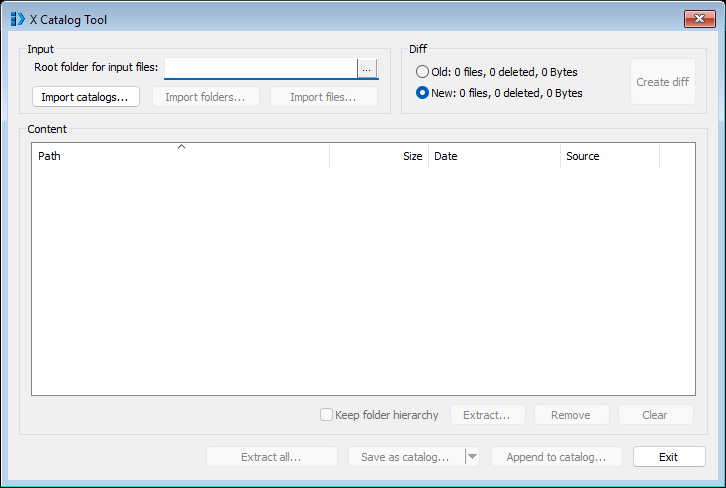
Four areas, and the window is a fixed size:
- Input - where content comes from.
Import catalogs...is always available;Import folders...andImport files...need a root folder first, because that is what the paths inside the archive will be relative to. - Diff - two content sets,
OldandNew, each with its own file count, deletion count and size. The radio button chooses which one everything else on the window is working on.Newis the default and stays the working set for a normal pack or extract;Oldis only there to have something to diff against. - Content - the current set, as
Path,Size,DateandSource.Sourceis the catalog or folder each entry came from, which is the only way to see what won after several imports. The list is always in catalog order - by the lowercased path - and the headers are not clickable, so there is no sorting by size or date. - The buttons: per selection under the list, for the whole set along the bottom.
Everything on the window applies to the selected side only. Switching between Old and New swaps the list, and leaves the other side untouched. The window has no resize border and no maximize button, so on a large catalog the list shows about fourteen rows however much screen there is.
Getting content in
Set the root folder, then import. There is no filtering here at all - what is in the folder is what comes in:
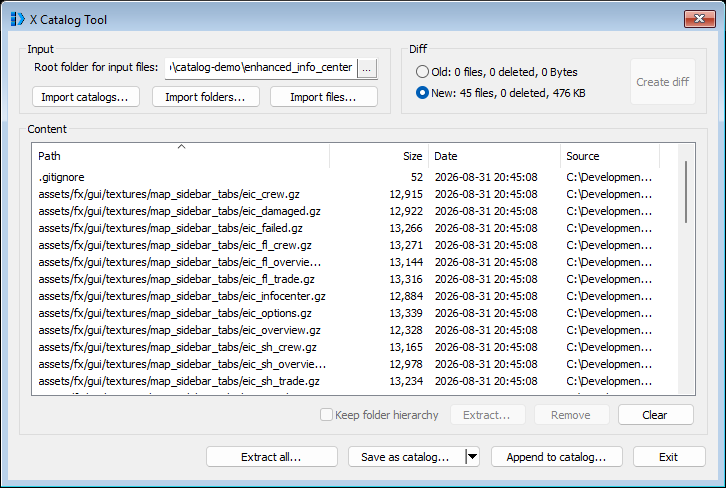
- Import catalogs... reads a
.catand its.dat. Selecting several at once imports them in alphabetical order. - Import folders... and Import files... take the root folder as the base of every path. Importing from a sub-folder of the root keeps the hierarchy.
- Drag and drop does the same as the buttons, and follows the same rule about the root folder. Dropping
.catfiles on their own imports them as catalogs; dropping them alongside other files treats all of it as ordinary files. - A later import overwrites an entry a previous one had already put there.
Working on a selection
Selecting rows enables the four controls under the list, and the status line on the left counts what is selected:
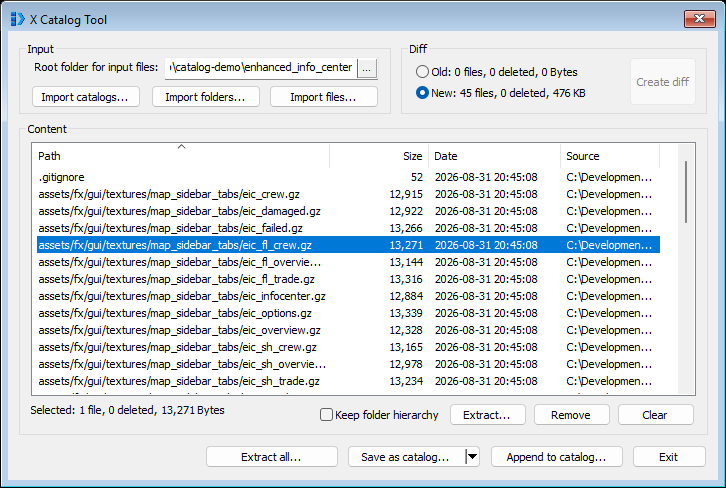
- Extract... writes the selected entries to a folder. With Keep folder hierarchy ticked they land in sub-folders; without it they all land flat in the one folder, which is convenient for pulling out a handful of files and destructive if two of them share a name.
- Remove takes the selected entries out of the working set. It changes nothing on disk - the set is what will be written, not what was read.
- Clear empties the current side.
Old, New, and Create diff
To build a version catalog or check what a release actually changed, load the previous build into Old and the new one into New. Either side takes catalogs, folders or files, in any combination:
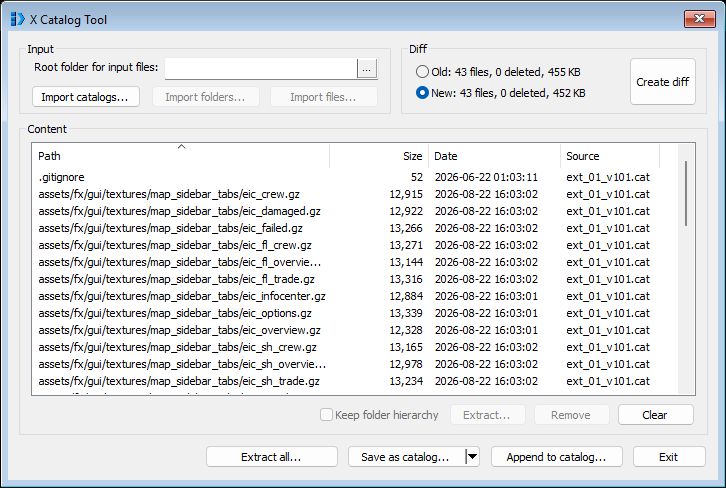
Create diff replaces the New content with the difference and leaves Old alone. Deleted entries stay in the list as rows with no size, no date and no source:
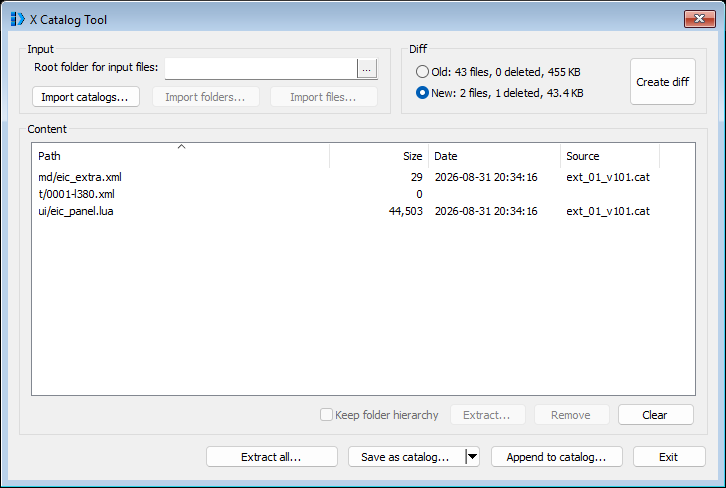
The comparison is the command line tool's, so the same two notes apply: content decides, not the timestamp, and an empty file is the exception.
Writing it out
- Extract all... writes every entry of the current side to a folder, always with the hierarchy.
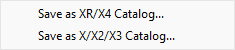
- Save as catalog... writes the whole side to a new
.catand.dat. The arrow beside it offers the X/X2/X3 format instead of the XR/X4 one. - Append to catalog... adds the current side to an existing catalog. As on the command line, the existing content is not consulted at all: entries are appended, not merged.
Two warnings from the readme are real. Do not save over a catalog that is currently imported - it is the live source for the entries being written. And the window stops responding while it extracts or saves; a large catalog is a wait, not a hang.
What the GUI cannot do
No -include or -exclude. Nothing beyond the initial catalogs is scriptable. No -dump. For a repeatable build - which is what packing a mod is - the command line is the tool and the GUI is the inspector.
Traps
A folder import takes the whole folder. There is no ignore list, no dotfile rule and no default exclusion of anything. Pointed at a working copy, the tool packs .git too:
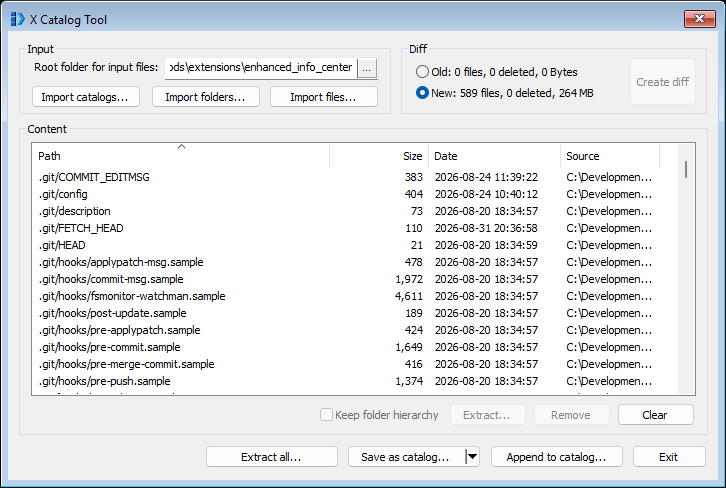
WorkshopTool -buildcat has the same blind spot - its exclude list is by file extension, and the files under .git/objects have none - so a Workshop upload built straight from a working copy carries the repository inside it. Build from an export, or pass -exclude "^\.git/".
content.xml does not belong in the catalog. The game reads it from the extension folder before it opens any catalog. Packing it in is harmless but pointless; publishing it in is worse, because the copy in the archive is then a second, stale version of the file the Workshop maintains.
Case is not preserved in the sort, only in the store. A tool that lists a catalog's entries in raw byte order will disagree with the tool that wrote it. Sort on the lowercased path.
-append is not a merge. It duplicates rather than replaces, and the paths follow the -in root of that append, not of the original pack.
An output folder is never created. -out C:\new\folder fails outright rather than making it.
Read failures do not fail the run. A missing or truncated .dat produces per-file messages and exit code 0.